How Security Scanners Help Staff Screen People and Bags Safely

Security screening uses imaging systems to check people and bags without opening luggage or requiring a physical search in every case. At airports and other busy checkpoints, different scanners look for different types of potential threats, while trained staff review alerts and decide what should happen next.
Different scanners serve different purposes
A walk-through metal detector flags metal objects carried on a person. It can identify a possible concern, but it does not show exactly what the object is or detect every non-metal item.
A body scanner looks for objects concealed beneath clothing. Depending on its technology, it may use millimeter waves, terahertz signals, or low-dose X-rays to produce an image or alert for an operator to assess. Some systems are designed to scan a person who is standing still, without requiring a particular pose.
Luggage scanners show the contents of bags on a screen, so staff can inspect them without unpacking everything. An xray suitcase screening system may use X-ray imaging, while computed tomography systems create three-dimensional views that can help operators examine overlapping objects.
See also: The Importance of Health in Everyday Life
What the technologies can reveal
Each screening method has strengths and limits. Metal detectors focus on metal, body scanners look for concealed items on a person, and baggage systems inspect objects inside luggage. Depending on the equipment and the screening rules, these systems may help identify items such as weapons, explosives, liquids, or other prohibited goods.
Images are not always straightforward. Items can overlap, appear unusual because of their shape or material, or trigger an alert that turns out to have an ordinary explanation. A scanner is a screening tool, not a final judgment about what an image means.
Staff interpret images and resolve alerts
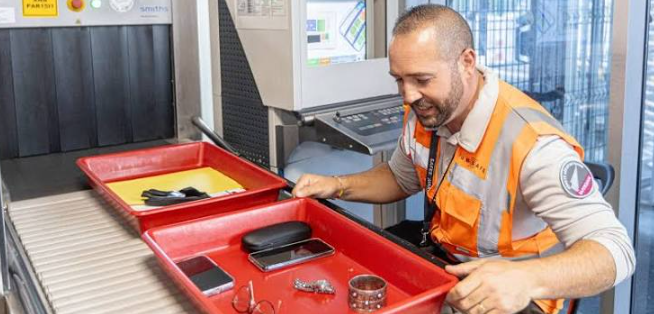
Trained operators review scanner images and automated alerts, then follow procedures to resolve possible concerns. That may involve asking a passenger to step aside, checking an item more closely, or using another screening method. The appropriate response depends on the alert and the rules at that checkpoint.
Automated detection can help staff focus their attention, but it does not remove the need for human review. Operators need to understand the system, recognize when an image is unclear, and avoid treating an alert as proof of a threat.
Privacy and safety shape the process
Screening procedures are designed to balance security with passenger privacy and safety. Depending on local rules and the equipment, safeguards may include limiting who can view images, using software that highlights areas of concern rather than displaying identifying details, and restricting how screening information is handled.
Different scanner technologies also have different operating requirements. Checkpoint managers should follow the manufacturer’s instructions and applicable regulations, and explain screening procedures clearly so passengers know what to expect.
Speed still depends on careful judgment
Automated alerts and newer imaging systems can support faster screening, especially when queues are long. But moving people through a checkpoint quickly is only useful if staff have enough time and training to review unclear images and investigate concerns appropriately.
Effective screening combines suitable equipment, clear procedures, and attentive human judgment. Each scanner contributes a different kind of information, and staff use that information to decide whether a routine check is enough or further inspection is needed.